Showing posts with label mac. Show all posts

2009-04-09

Dual-boot Linux and Mac OS X on Intel-based iMac

by Forrest Sheng Bao http://fsbao.net

I just got a new iMac. Yes, the latest Apple iMac, the 24-inch one, with 4G DDR3 memory, 2.66GHz Intel Core 2 Duo CPU (almost 15, 000 integer MIPS (Dhrystone) and 5,000 floating point MIPS (Whetstone)), and nVidia GeForce 9400M graphic processor.

Ok, so, how to install Ubuntu on an Intel-based iMac? There is a good instruction for you at Ubuntu Help. https://help.ubuntu.com/community/MactelSupportTeam/AppleIntelInstallation

The general idea is:

1. Google, download and install rEFlt. Make sure that you can see its interface when you boot up your Mac. Most likely, you need to SHUTDOWN the Mac and then start it. RESTART does not work. If you update your Mac OS X, Mac OS X may rewrite the bootload. So you need to reinstall rEFlt in Mac OS X. It should be look like the one on rEFlt official website, but without Linux and Windows option, just a Mac OS X.
http://refit.sourceforge.net/screen.html
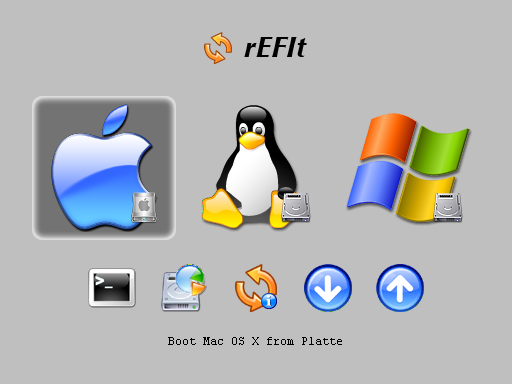


2. Prepare the partition for Linux. You can use BootCamp Assistant or Disk Utility to do so. I splitted a big partition for Linux and used Ubuntu installation program later to do further partitioning, i.e. one for / and one for swap.


3. Insert Ubuntu installation CD into Mac and reboot your Mac from it. Install it. Do remember to install bootloader on the Linux root partition (NOT MBR or other places) by clicking Advanced button like this:

This is how my bootloader selection menu looks like.


Update 2011-12-23: I fully swiped out Mac OS X on my iMac. Now it has only Ubuntu Linux. This is how the bootloader selection look like now.


4. Reboot when done with the install, and in the rEFIt menu, choose the partition tool. It will attempt to sync the partition tables on your disk. Then SHUTDOWN the computer (not reboot), and start it up. You should be able to boot to Ubuntu now.

Here is a video regarding how Linux booted from my iMac.

2006-10-23

Ubuntu Linux on my PowerMac G4, READY!!

Forrest Sheng Bao <http://forrest.bao.googlepages.com>

After one week investigation- browsing blogs of Apple computer users using Linux and reading tons of webpages about Linux on Mac- I have successfully installed Ubuntu Linux 6.06 on my PowerMac computer today. Coz it works well, I plan to purchase a Mac Mini now.

I have used Linux on x86 computers for three years, since I was a sophermore. I love it. I run all my academic software supporing my rearch on it- Matlab, NI Labview, gnuplot, ns-2, scilab, maxima, Wolfram Mathematica, lindo/lingo, LaTeX toolchains, R, gEDA, Xilinx ISE, etc. As a EE undergraduate student, I can easily find academic and engineering tools, both commecial and open source ones. Much more package choice than that on the furking Microsoft Windows. The open source culture gives me the feeling of "infinity".

But many open source software also work on Mac OS. So I have to use it. For example, the PsychoToolBox developed by some guys in Medical School of Harvard. It is a collection of MATLAB scripts generating diverse pattens on the computer screen. Although Mac OS and Windows are all propertorial OSes, but Mac users and Windows users are different. Mac users like Open Source more than Windows users. They have their own culture. If you go to the website of Apple Science, you can see that Apple is providing support for many open source projects.

But I think, the most "culture" computer users are Linuxians. Not because I am a Linux user. I sometimes even use Solaris and FreeBSD. But I don't like them as I like Linux.

The reason why I wanna deploy Linux on my Mac is because I can't bear the ugly GUI of Mac OS 9.2. I don't wanna buy a new Mac, which means I can't use Mac OS X. The system is too out-of-date to run Mac OS X- A PowerPC G4 400MHz CPU with 512MB SDRAM. So, I plan to choose Linux which can also perform very well on poor x86 computers, such as my old 800Mhz Duron CPU computer. (Well, I don't use it now. I am now using a Athlon 2500+ computer for x86 applications.)

Another reason is I really don't like the menu style of Mac OS. There is only one button on the mouse. To do every manipulation, you have to move your mouse to the top of the screen. Don't expect me to remember those keyboard shortcuts. And there is no wheel on Apple mouse for scrolling webpages. But on Linux running on an Apple computer, I can use two buttons and the wheel.

The third reason is that it is more and more difficult to find applications for Mac OS 9. There are lots of applications running on Mac OS X. For instance, the Mozilla Firefox browser. How can I use an OS that has less and less programs can run on it?

Just like what Linux did on x86, this time, it doesn't disappoint me on my Mac. Now I can enjoy the beautiful GUI and continue my work on other Linux computers. Linux provide a uniform platform for all my applications now.

I am lov'in it!
Ich liebe es!

-------------Hard Drive Partition
forrest@forrest-mac:~$ sudo fdisk -l
/dev/hda
# type name length base ( size ) system
/dev/hda1 Apple_partition_map Apple 63 @ 1 ( 31.5k) Partition map
/dev/hda2 Apple_Bootstrap untitled 1954 @ 64 (977.0k) NewWorld bootblock
/dev/hda3 Apple_UNIX_SVR2 untitled 7994141 @ 2018 ( 3.8G) Linux native
/dev/hda4 Apple_UNIX_SVR2 swap 422657 @ 7996159 (206.4M) Linux swap

Block size=512, Number of Blocks=8418816
DeviceType=0x0, DeviceId=0x0
Drivers-
1: @ 64 for 23, type=0x1
2: @ 118 for 36, type=0xffff
3: @ 192 for 21, type=0x701
4: @ 246 for 34, type=0xf8ff