Showing posts with label computational neuroscience. Show all posts

2015-08-05

Epilepsy 101 for Computational People

Disclaimer: This document cannot be used as any ground for medical and legal purposes. I write this up just because I am tired of explaining basic epilepsy terms to my colleagues (informatists, not neurologists) again and again.

  1. Epilepsy is a neurological disorder while seizure is a characteristic symptom of epilepsy. Jerks are one kind of seizures.
  2. In 1981, ILAE made a seizure classification that is widely used until today
    1. Focal Seizures: seizure limited in or originated from one hemisphere of the brain
      1. simple partial seizures, (simple: no interruption on consciousness)
      2. complex partial seizures, (complex: with interruption on consciousness) and
      3. partial seizure evolving into secondary generalized seizures, about 1/3 of partial seizures
    2. (Primary) Generalized Seizures: seizure all over the brain
      1. absence seizures (kinda like blackout), formerly called petit mal
      2. tonic-clonic seizures (kinda like whole-body jerk), formerly called grand mal
      3. many other generalized seizures
    3. Unclassified epileptic seizures
  3. In 1989, ILAE made an epilepsy classification that is widely used until today
    1. Focal Epilepsies
      1. sympotomatic or cryptogenic (cause unknown): e.g., temporal lobe epilepsy (TLE)
      2. idopathic (genetic causes): e.g., benign childhood epilepsy
    2. Generalized Epilepsies
      1. sympotomatic or cryptogenic (cause unknown): e.g., West syndrome, Lennox-Gastaut syndrom
      2. idiopathic: e.g., childhood absence epilepsy, juvenile absence epilepsy,
    3. Epilepsies undertermined whether focal or generalized
  4. When seizure is onset, we say the subject is in ictal state. Otherwise, interictal state. Because seizure duration (few seconds/minutes) is much shorter compared with interictal period, interictal EEG is more accessible.
  5. EEG is a gold standard for epilepsy diagnosis. However, neurologists heavily rely on either ictal EEG or interictal epileptiform discharges (IEDs, such as sharp wave and spikes) in diagnosis. The IEDs are the distinctive EEG patterns for epilepsy when subjects are not in seizure. Because seizure and IEDs happen unpredictably and sporadically, the way to catch them is to use long-term EEG recordings which can last from hours to days. Such tedious procedure is costly and inconvenient.
  6. Typical signal processing and machine learning problems related to epileptic EEG
    1. coarse epilepsy diagnosis: distinguishing epileptic interictal EEG (with or without IEDs) and non-epileptic EEG
    2. fine epilepsy/seizure diagnosis: identifying the type of seizure and/or epilepsy based on ictal or interictal EEG
    3. seizure detection: detecting seizure activities from epileptic subjects' EEG
    4. seizure prediction: predicting the onsets of seizure activities from epileptic subjects' EEG
    5. focus localization: locating the epileptogenic zone (for focal seizures only)

References:
1. For complete list of seizure types and epilepsy types, check Tables 9-1 and 9-2 on Pages 121-122 of this doc from British gov: http://www.nice.org.uk/guidance/cg137/resources/cg137-epilepsy-full-guideline3 which are reprinted from 1981 and 1989 ILAE classifications.

2013-10-23

High Frequency Brain Signals (HFBS) in EEG and MEG, Part Two: A scientific hypothesis

Last week, I wrote a blog post about High Frequency Brain Signals (HFBS) in EEG and MEG. In that post, I made an assumption that the HFBS we observed might be introduced by windowing function. Of course, I do not have any support to prove nor to disprove this assumption.

Today, I will explain why HFBS is a scientific hypothesis.

The signal in each  M/EEG (EEG or MEG) channel is the composition of activities of thousands or millions of neurons. Limited by the mechanism that neurons fire, one neuron won't generate HFBS - at least not those at hundreds of Hertz. When thousands or millions of them all fire, and the composition happens to be non-linear, things could be different.

For example, from basic trigonometry, we know that:
$$\sin(2x) = 2\sin(x)\cos(x)$$ and $$\cos(2x) = \cos^2(x) - \sin^2(x)$$
See? The frequency is doubled on the left hand side of the two equations.

If multiplication between brain signals could happen, then we can get signals of higher frequency. In physics and electrical engineering, such higher frequency signals are called harmonics and are related to a very annoying trouble in communication systems: intermodulation noise/distortion. Can you guarantee that our brain is a linear system?

Since neurons do not fire independently (many papers are discussing synchrony and connectivity of the brain), it's reasonable to assume that multiplication and even more complicated operations could happen on signals from neurons. Such composed signals are captured by M/EEG.

Therefore, it is scientific to hypothesize that HFBS is real from the brain, not introduced by sampling techniques. In this sense, HFBS is a useful tool to study how our brain works.

Comments are welcome, especially those from DSP or neuroscience field.

2013-10-02

High Frequency Brain Signals (HFBS) in EEG and MEG, Part One: A delusion from spectral leakage?

Update 10/23/2013: If the sampling frequency is 2000Hz, the highest frequency that windowing function can introduce is 1000Hz. If 1000Hz signal is observed in digital signal, it does not necessarily mean that the analog signal has 1000Hz component. In this case, the 1000Hz signal may not be from the brain but the sampling technique used.

About a month ago, I met a friend in Cincinnati Children's Hospital on my way from Texas to Ohio. His research is about high frequency brain signals (HFBS, >70Hz) in MEG. He told me that many reviewers couldn't quite understand why there are signals up to hundreds of Hertz in MEG because neuronal activities cannot be that fast.

As a man of science, I strongly believe in my friend's hypothesis but at the same time remain equally skeptical.

Hence, I decide to write 2 blog posts to first challenge him and then support him. Today, I am gonna give him some hard time: it is scientifically reasonable that HFBS may be a delusion caused by a phenomenon known as spectral leakage

Short version: One can get high amplitude at any frequency (between 0Hz and half of the sampling frequency) from even a constant signal (i.e., exactly 0Hz) - if you use a bad window function when sampling the data.

Here is the detail. Today, almost all neurophysiological signals, including EEG and MEG, are sampled using Digital Signal Processing (DSP). In order to digitize data from the analog world, we sample them by applying a window function. A bad window function, e.g., a rectangular window, can give you high amplitude from 0Hz to half of the sampling frequency in spectral domain, like this:

Rectangular window and its Fourier Transform. Leaked frequencies are relatively high.
Source: Wikipedia (You will see the same in any DSP textbook.)
This phenomenon is called spectral leakage. You can consider it as frequency components not in the signal "leak" into the spectrum.

Using a better window function, such as Hamming window, can reduce the effect of spectral leakage. For example, the amplitude(s) of "real" frequency(-ies) can be much higher than those of leaked frequencies.

Rectangular window and its Fourier Transform. Leaked frequencies are 1000 times (-60dB) lower than the main frequency. Source: Wikipedia (You will see the same in any DSP textbook.)
But sadly we cannot eliminate spectral leakage. Hence, you always have leaked frequencies while their amplitudes may not be small. The question is, are the amplitudes of HFBS high enough? I need to read more papers on this topic before I can make a claim.

If you wanna understand mathematically why we can never get rid of spectral leakage, go grab any DSP textbook (unfortunately, lots of math) and you will get it.

Comments are welcome, especially those from DSP or neuroscience field.

References:
  • Xiang et al., Neuromagnetic correlates of developmental changes in
    endogenous high-frequency brain oscillations in children: A wavelet-based beamformer study, Brain Research, 1274 (2009):28--39
    [The discussion part of this paper explains the sources of low frequency neuronal activities and high frequency ones. ]
  • Xiang et al., Noninvasive localization of epileptogenic zones with ictal high-frequency neuromagnetic signals, Journal of Neurosurgery: Pediatrics,
    2010 Jan; 5(1):113--22.

2012-06-30

VTK Polygons and other cells as vtkCellArray in Python

After hours of googling and playing with iPython, I finally figured out the way to access polygons or other cells in VTK files using Python.

The Python binding of vtk library seems missing a very important function for users to access cells/polygons in Python, as mentioned in a VTK mailing list post back to 2002 and another post in 2011.

A workaround I just found out is as follows. Suppose you have a VTK file called test.vtk containing the following data.

# vtk DataFile Version 2.0
Cube example
ASCII

DATASET POLYDATA
POINTS 8 float
0.0 0.0 0.0
1.0 0.0 0.0
1.0 1.0 0.0
0.0 1.0 0.0
0.0 0.0 1.0
1.0 0.0 1.0
1.0 1.0 1.0
0.0 1.0 1.0

POLYGONS 3 12
3 0 1 2 
3 4 5 6
3 7 4 2

Now I use interactions on iPython to demonstrate the accessing to POLYGONS.

First, we prepare the accessing.
In [1]: import vtk

In [2]: Reader = vtk.vtkDataSetReader()

In [3]: Reader.SetFileName('test.vtk')

In [4]: Reader.Update()

In [5]: Data = Reader.GetOutput()

In [6]: CellArray = Data.GetPolys()

In [7]: Polygons = CellArray.GetData()

Now check the number of cells/polygons and number of points in cells/polygons
In [8]: CellArray.GetNumberOfCells()
Out[8]: 3L

In [9]: Polygons.GetNumberOfTuples()
Out[9]: 12L

All cells/polygons can be accessed like this:
In [10]: for i in xrange(0,  Polygons.GetNumberOfTuples()):
   ....:         print Polygons.GetValue(i)
   ....: 
3
0
1
2
3
4
5
6
3
7
4
2
Please note that the numbers (3's here) indicating sizes of cells (i.e., the numbers at the beginning of every line in Cell/Polygon segment in a VTK file) are also retrieved and printed.

If all your cells/polygons are of the same size, e.g., all triangles, here is an easy way.
In [11]: for i in xrange(0,  CellArray.GetNumberOfCells()):
   ....:         print [Polygons.GetValue(j) for j in xrange(i*3+1, i*3+4) ]
   ....: 
[0L, 1L, 2L]
[3L, 4L, 5L]
[6L, 3L, 7L]

2011-10-29

Picking values from a point in Mayavi2

Sometimes we have scientific data, each point of which has multiple values associated with. If the data is visualized, we want to pick up values at certain points. I have been needing this features for too long. And today someone gave me some hints to figured it out.

Step 1 (optional): prepare your VTK file. Make sure you have POINT_DATA and/or CELL_DATA segment(s). Do NOT create multiple POINT_DATA n and/or CELL_DATA n lines in one file - VTK format is linear.

Step 2: Start Mayavi2 GUI application and load the VTK file. There are two ways to do so.

I am always lazy. So I run command like the one below from UNIX/Linux Shell.
mayavi2 -d  ../Data/brains/50201_surf/lh.sulc.fundi.from.pits.inflated.final.vtk -m Surface

You can also use GUI menu in Mayavi2. This will take two steps.
  1. Load the data: File-> Load data -> Open file ...
  2. Visualize: Suppose we want the surface of the data now. Visualize->Modules
Step 3: Choose the proper data attribute.
Click the data file in the Engine Tree View. Select the proper data attribute in Mayavi object editor below. For example, I select CmpntID in Point scalars name.


Step 4 (optional): Turn on LUT legend.
Click the Color and legends below the VTK file in Engine Tree View. If the data attribute is scalar, select Scalar LUT tab and check Show legend. Then you will see a legend bar on the right of your scene.


Step 5: Select points. This part a little bit tricky because 1) you are selecting a 3-D object on a 2-D interface and 2) the GUI of Mayavi2 isn't very user-friendly for this purpose.

  1. Move you mouse over a random place (or over your the point you wanna pick data) on the scene. 
  2. Press 'p' on your keyboard. A dialog box titled Edit properties will pop up. 
  3. Make sure that you selected Pick type as point_picker. And choose a small enough Tolerance level. I don't know what it means but if it is smaller, it's easier to precisely pick up a point. The default tolerance is 0.025. I prefer 0.01. 
  4. Now click on somewhere you really wanna pick on the scene, and then click 'p'. There will be a 3-D crosshair. It is very useful because it tells you where you really selected. 
  5. On the Edit properties window, there are some value. In our case, we care about the scalar (fundusID). It reads 41.0 on the snapshot, and it matches the value on legend bar for points of this color. If there is a mismatch, rotate the object and redo. 
  6. Repeat step 4 and 5 to find out scalar values you care at other places. Press 'p' every time after selecting somewhere. You should at least see coordinates changes when you select different places. The legend bar on the right can help you verify the scalar value you pick. You should read none for all fields if you move mouse out of the object. 
Troubleshooting: 
1. If coordinates do not change when your click different places, check whether the cursor falls in the History box in Edit Properties dialog box.) In that case, you shall see a lot of p's in the History box (on the top or at the end mostly).
2. If you keep missing a point while the mouse seems to be over it, rotate the object. Selection a 3-D subject in 2-D visualization means you will always miss on one dimension/axis. 
3. A help for the problem above is to press Alt+3 on the scene and put on a pair of 3-D anaglyph glasses. This will enable your real 3-D view. 

2011-07-02

The schematic for my ECG sampling circuit

by Forrest Sheng Bao http://fsbao.net

So here is the schematic of my ECG sampling circuit. I designed the circuit in fall 2010.

I would like to say that TI's(well, Burr-Brown's) instrumentation amplifier is awesome. You just put things together and then they rock. No need to tune the peripheral circuit. It's kinda like out-of-the-box solutions. Since the gain can be very high (10000 times linear), i think they can even be used for EEG sampling circuit.

I did not build the ADC circuit and interface to computers, but used NI myDAQ. The power supply for this circuit is also provided by NI myDAQ.

There are three electrodes connected to human body, the belly (ground), the left wrist (one input), and the right wrist (the other input).

This circuit can also sample signals output from NI myDAQ back to test the property of the circuit. Since the lowest resolution to NI myDAQ is 100mV, i used an op-amp (OPA177) as a voltage divider to scale down the output signal from NI myDAQ to its 1/10 (in voltage amplitude).

The schematic was drawn by gEDA/gschem. Click to enlarge.


2010-10-14

high resolution ADC vs. high-gain amplifier: A lesson from Bode Analyzer of NI myDAQ

by Forrest Sheng Bao http://fsbao.net

Around a month ago, I met an engineer from an EEG sampling system company. I asked him many specifications of their circuit. He told me that they only amplify the EEG signal by 20 or 30 times and then feed it to a 24-bit ADC. Besides noise issues,  did not understand why they chose high-resolution ADC over high-gain amplifier. Today I learned a lesson and figured out.

I am using NI myDAQ these days to test the amplification (very high gain, expected to be 10,000 or 80dB) circuit I prepared for ECG data acquisition project. Of course, Bode plot is what I used to the check the gain and phase shift.

My configuration. The chip on the left is an TI OPA177 used to divide the input voltage of INA128 to as low as 1mV. The minimum resolution of the Function Generator of NI myDAQ is 10mV and I wanted the signal amplitude to be as low as raw ECG. The chip on the right is TI INA128, with R_G set as 5 Ohm. The output signal of INA128 is filtered by an RC bandpass filter and then goes to myDAQ. There was an error in the circuit when I shot this picture. The ground of RC circuit was not grounded.

Any analog circuit has a setting time (at least the speed of light), e.g., to reach a feedback balance. When the gain of an amplifier goes very high, the setting time increases nonlinearly. According to the datasheet (http://www.ti.com/lit/gpn/ina128) from Texas Instruments, the setting time of instrumentation amplifier INA128 is 9 us when gain is 100 while 80 us when gain is 1000. The gain of INA128 ranges from 1 to 10000. But the datasheet does not say what will happen for gain larger than 1000. Why? Probably because the setting time is very long and varies from device to device.

This is like many bivariate constraints in analog circuit design, e.g., gain-bandwidth product. Therefore, in Bode analysis, it needs to wait significant long enough time before you can measure the output and move the next frequency. 

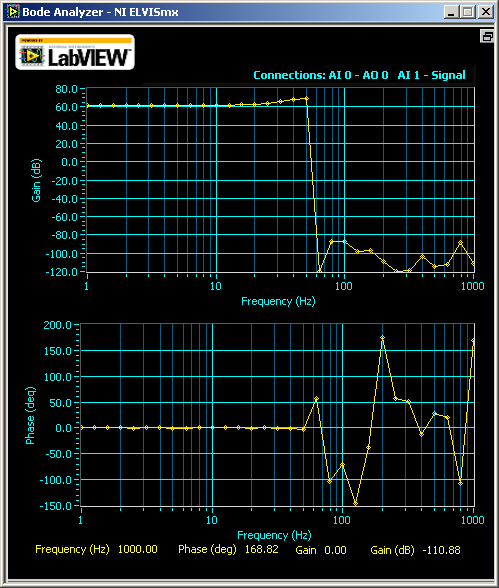
But the Bode Analyzer that comes with NI myDAQ (also used on NI ElVIS II/II+), does not give the circuit enough setting time. The software measures the output before the circuit can settle down from the input stimulus.

What happened was, when gain is 1000, I saw this
I said, what? Where are my signals over 14 Hz? But when I increase the gain to 5000 (well, from myDAQ's oscilloscope which now I assume has errors too because the theoretical gain for my configuration is 10,000.), I was thinking to withdraw this class:
The gain was constantly high before 10 Hz and dropped drastically after that. The phase shifting plot looked like stock market after that. According to the datasheet of INA128, the gain should not drop before 1kHz.

Why? Now I know the answer, because the Bode Analyzer did not wait until the circuit to stabilize. It measured unstable output. As the gain goes higher, more waiting time is needed.

But at that moment, I did not think about this. I tried another way to study the problem, using other instruments. I checked the waveform on the Oscilloscope of NI myDAQ while letting the Function Generator of myDAQ sweep from 1 Hz to 20Hz, with a step of 0.5 Hz. And, I let the signal stay at each frequency for 3 second, way enough for the circuit to stabilize. By comparing the Vp-p on the oscilloscope, I saw that my circuit wasn't as bad as the Bode plot showed. It was as designed.

Below is a video I took when the Function Generator swept. I didn't save the original video for the output from INA128. Instead, I recorded the output waveform from an RC bandpass filter following the output of INA128 (blue line). The green line was the input to INA128. I set the cutoff frequency of the RC filter at 15Hz (which is not exact because the discrete components have 5% error each). As you can see, the signal drops gradually after 8Hz but not at a >100dB attenuation. Also, the phase shift wasn't as crazy as stock market. The shift was almost invisible. Of course, I need to fix the circuit because apparently, the -3-dB point was at 22Hz (not shown on the screen as I ended the screencast early).


So, go back to my question, why medical instruments prefer high-resolution ADC over high-gain amplifier, besides noise issues. Well, a high-gain amplifier takes long time to stabilize (INA128 takes 80us to set at G=1000), then the sampling rate cannot be high (for INA128, sampling rate can not be higher than 10kHz when G=1000). The setting time for amplifiers at high gain, is longer than the setting time of a high-resolution ADC (which can handle MHz signal).

PS: Another interesting thing is that Bode Analyzer of myDAQ gave me this for TI INA101:
 I would like to know whether INA101 is really bad from 1 to 10 Hz or it's another problem of the Bode Analyzer of myDAQ.

2010-06-29

Do computers know EEG reading?

This is how neurologists check frequencies and amplitudes of EEG signals in the old days - I found this card from the back cover of a Japanese book (2006) about EEG reading.

The method is matching boxes, e.g., 1-30, to EEG waves. If the number of peaks matches box n, then the frequency of the wave is n Hz. Of course, a wave can have many frequency components and thus matches several boxes on different amplitudes, like lower frequencies modulated onto higher frequencies - just imaging how sin(x)*sin(4x) look like in your high school math class.

Now, with computerized EEG recordings, neurologists still are using this way to diagnose. The only difference is that the boxes on the card are replaced by different background rulers on computer screens. So are amplitude rulers.

The question is, whether representing the knowledge and methods from physicians is the only way we can teach computers to read EEG? If this is the only possible track, then how we can teach computers to identify different wave patterns, in time domain?  If the answer is yes, then a lotta work done in these years about spike detection is a killer approach.

But, "do submarines swim?" "They just don't swim in the way you swim." Dr. Dijkstra, who served as Computer Science Department chair at UT Austin between 1984- 2000.

So, another approach is to teach computers a whole new way to mathematically analyze EEG waveforms, not following the way that physicians use which identifies particular EEG patterns, like spike-slow waves. For example, we may teach computers that the skews in this EEG is different from skews in another EEG.

2009-10-24

EEG Signal Processing in Python and Scipy.Signal (1): Spectrum Estimation, FIR Filter Design, Convolution and Windowing

by Forrest Sheng Bao http://fsbao.net

(Update 2012-12-22: People have been asking about the input format of the EEG data. Well, there is no input - because I didn't use any function. My code loads data from a text file (a TSV one), where rows correspond to sampling instant sequentially and columns correspond to channels. Therefore, you just need to ensure that the variable eeg is a 2-D list or numpy array such that any row is sublist/subarray representing the value from all channels at a sampling time. For example, if you have only two sampling instants for a 4-channel EEG, you would expect eeg to be like [[1,2,3,4],[5,6,7,8]].)

I am doing a take-home midterm test of a class I am taking. So, I decided to use Python to to it. Below is a code for one problem. It includes several frequency used functions in classical signal spectral analysis and FIR filter design. The problem itself is to design bandpass filters over alpha to theta bands and apply them onto a EEG series, and plot the time domain and frequency domain signal, as well as the frequency response of filters. I used window methods to design FIR bandpass filters. The filters coefficients are smoothed by a Kaiser window. Filtering is implemented by convolving original signal with coefficients of filters.

The result of running this code is given below. Black lines in the bottom plot is the amplitude property of different filters. As you can see, signals outside filter bands are kicked out respectively.


# This software is a free software that comes with NO WARRANTY
# You have the right to obtain, modify and redistribute this code 
# under the terms of  GNU General Public License ver. 3 or later
# Copyleft 2009 Forrest Sheng Bao http://fsbao.net

from numpy import *
from scipy.signal import *
from numpy.fft import * 
from matplotlib import *
from scipy import *
from pylab import *

f=open('./EEG1_1c31.txt','r')
chno = 16   # total number of channels
eeg = [] 

while True:
 testline = f.readline()
 if len(testline) == 0:
  break #EOF
 testline = testline.split()
 eeg.append([])
 for i in xrange(0,chno):
  eeg[-1].append(float(testline[i])) 

ch = 1 # particualr channel to study 
eeg = array(eeg)
y = eeg[:,ch]         # the signal, study channel 'ch'
L = len(y)            # signal length
fs = 500.0              # sampling rate
T = 1/fs                # sample time
t= linspace(1,L,L)*T   # time vector

f = fs*linspace(0,L/10,L/10)/L  # single side frequency vector, real frequency up to fs/2
Y = fft(y)

figure()
filtered = []
b= [] # store filter coefficient
cutoff = [0.5,4.0,7.0,12.0,30.0]

for band in xrange(0, len(cutoff)-1):
 wl = 2*cutoff[band]/fs*pi
 wh = 2*cutoff[band+1]/fs*pi
 M = 512      # Set number of weights as 128
 bn = zeros(M)
 
 for i in xrange(0,M):     # Generate bandpass weighting function
  n = i-  M/2       # Make symmetrical
  if n == 0:
   bn[i] = wh/pi - wl/pi;
  else:
   bn[i] = (sin(wh*n))/(pi*n) - (sin(wl*n))/(pi*n)   # Filter impulse response
 
 bn = bn*kaiser(M,5.2)  # apply Kaiser window, alpha= 5.2
 b.append(bn)
 
 [w,h]=freqz(bn,1)
 filtered.append(convolve(bn, y)) # filter the signal by convolving the signal with filter coefficients

figure(figsize=[16, 10])
subplot(2, 1, 1)
plot(y)
for i in xrange(0, len(filtered)):
  y_p = filtered[i]
  plot(y_p[ M/2:L+M/2])
axis('tight')
title('Time domain')
xlabel('Time (seconds)')

subplot(2, 1, 2)
plot(f,2*abs(Y[0:L/10]))
for i in xrange(0, len(filtered)):
  Y = filtered[i]
  Y = fft(Y [ M/2:L+M/2])
  plot(f,abs(Y[0:L/10]))
axis('tight')
legend(['original','delta band, 0-4 Hz','theta band, 4-7 Hz','alpha band, 7-12 Hz','beta band, 12-30 Hz'])

for i in xrange(0, len(filtered)):   # plot filter's frequency response
  H = abs(fft(b[i], L))
  H = H*1.2*(max(Y)/max(H))
  plot(f, 3*H[0:L/10], 'k')    
axis('tight')
title('Frequency domain')
xlabel('Frequency (Hz)')
subplots_adjust(left=0.04, bottom=0.04, right=0.99, top=0.97)
savefig('filtered.png')
Reference: Signal Processing Toolbox of Scipy, http://docs.scipy.org/doc/scipy/reference/signal.html

2009-05-14

EDFbrowser working with discontinuous EDF+ file

by Forrest Sheng Bao http://fsbao.net

EDFbrowser is an open source EDF Browser. EDF/EDF+ is an open file format for biomedical time series, especially EEG and ECG/EKG signal.

But, the pain is, new (version 1.08 or later) EDFbrowswer "disabled the possibility to open discontinuous files."

I consulted the author, Teunis van Beelen, and got a solution from him.
  1. Open the file mainwindow.cpp in a texteditor.
  2. Comment the lines 1293 to 1310. Put /* and */ at the beginning and end of following code
    if(edfhdr->discontinuous)
    {
    if(edfhdr->edf)
    {
    UI_Messagewindow popuperror("Error", "EDFbrowser can not show EDF+D (discontinuous) files.\n"
    "Convert this file to EDF+C first. You can find this converter\n"
    "in the Tools menu (EDF+D to EDF+C converter).");
    }

    if(edfhdr->bdf)
    {
    UI_Messagewindow popuperror("Error", "EDFbrowser can not show BDF+D (discontinuous) files.\n"
    "Convert this file to BDF+C first. You can find this converter\n"
    "in the Tools menu (EDF+D to EDF+C converter).");
    }

    free(edfhdr->edfparam);
    free(edfhdr);
    fclose(newfile);

    return;
    }
    Now compile the source code by executing qmake && make and you are done.
Modifying this source code and recompiling it is legal since this software is distributed under GNU GPL v 2.

2008-06-19

Time stamp issues in EDF data converted from Stellate SIG format

by Forrest Sheng Bao http://fsbao.net

I think there is obvious a bug in Stellate Hamonie system, the software to sample data from EEG electrodes and manage them, convert them into EDF format. Actually, the EDF data converted from SIG has many problems, time stamps in wrong order, time stamps of wrong seconds, all-zero amplitudes, incorrect starting time, etc. I spent a lot of time to understand what's going on. At first, I was even frustrated that I couldn't use those data. Let's have a look at the data of their own SIG format and the data of EDF file converted from it.


This is the snapshot of viewing one channel data from their software, the Hamonie. The resolution of Y-axe is 10uV/mm while the time interval between two vertical green bars is 1 second.


This is the plot from EDF file converted by Hamonie, of the same data as above picture. The Y ticks are voltages in uV while the X ticks are numbers of sampling points (200 points = 1 second).

At first, the sign of above two images are opposite. This is because by default, the polarity in Stellate Hamonie system is negative up. Thus, their Y-axes is up-side-down. You can't change this setting in version 6.1, the one I got from the Chinese hospital. In version 6.2 of Stellate Browser, you can set it. Just click menu "Channels" -> "Edit", and set "Polarity" by clicking "Pos. Up" as follows:

The time stamps in EDF data have more problems. I used the Amplitude-Time cursor tool (In Stellate Browser menu: Tools -> Amplitude-Time curcor) to check exactly the value of each points on SIG data, and compare with those in EDF format data.

1. The time stamp of the first sampling point.

Firstly, according to EDF+ protocol, the time stamp of the first sampling point should be 0, which means the starting time of the series. If you sampling rate is 200Hz, then the time stamp of the second point is 0.005 - 0.005 second after the start. That makes the data I got can't pass the EDF compatibility test in several software. Let's have a look at the first sampling point of the EDF file:

23.303000,7.782218,-15.717028,5.035553,-9.765921,3.814813,-2.136295,4.272590,7.171848,9.765921,13.580733,19.837026,-30.060724,10.681476,-1.831110,-4.882960,11.749623,7.477033,-8.392588,13.580733,1.678518,-2.746665,11.597031
The 23.303 means this point is sampled 23.303 second after the record starts. Entries delimited by commas corresponds to signals defined in EDF header. For example, the 7.782218 corresponds to the Fp1 electrode.

I felt very confused about the relationship between the time stamps and time instants in SIG file. So I did a small experiment. I tried to read amplitude of first several samples of SIG data from Stellate Browser, and compared them with data read from EDF file.

Time stamp on SIG dataTime stamp on EDF dataAmplitude on SIG data (uV)Amplitude on EDF data (uV)
Sample #117:22:51:30523.30387.782128
Sample #217:22:51:31023.3081918.768878
Sample #317:22:51:31523.31388.239995
Sample #417:22:51:32023.3181212.20741
Sample #517:22:51:32523.32364.425183

Ok, so I think i don't need to care the time stamp. Each line follows the order.

2. Time stamps for any arbitrary interval

The doctors in China will tell me the time of ictal activities in form of absolute clock, like 22:23:34 Jun.03, 2008. I need to be able to locate the sampling point corresponding to a give time instant.

I did another verification to make sure the relationship is linear. As you can see from above two snapshots, there is a big peak, whose amplitude excesses 100uV, at round 5.5 second, thus the 1100th sample. Here are the data for that area:


Time stamp on SIG dataTime stamp on EDF dataAmplitude on SIG data (uV)Amplitude on EDF data (uV)
Sample #110917:22:56:85028.842109108.951051
Sample #111017:22:56:85528.847109109.408828
Sample #111117:22:56:86028.8529292.103282
Sample #111217:22:57:86528.8577878.432549
Sample #111317:22:57:87028.8527676.143661
Sample #111417:22:57:87528.8628483.925879
Sample #111517:22:57:88028.867112112.308086
Sample #111617:22:57:88528.8729897.506612
Sample #111717:22:57:89028.8778079.500697
Sample #111817:22:57:89528.8828585.146619
Sample #111917:22:57:90028.887104104.373275
I think my guessing is correct. The time between the 1st and the 1100th sampling is (1110-1) x 0.005 = 5.545 seconds. The time stamp of sample 1110 in SIG data should be 17:22:51.305 + 5.545s = 17.22.56.850. The time stamp of sample 1110 in EDF data should be 23.303 + 5.545 = 28.848. It's not 28.847! I checked the data and found the problem. The time stamp of the 200th sample is 24.298 while the one of the 201th sample is 24.302. I am not quite sure about the reason. Anyway, it's not a big deal.

3. Time stamps of last 1 second

The time stamp of the last 1 second is totally nonsense. The time stamp can jump from 36.297 to 0. In the data above, from 2601st sample to 2687th sample, the time stamps are from 0 to 0.430. The last time stamp of SIG data is 17:23:04.735, which should correspond to the 2687th sample ((17:23:04.735 - 17:22:51.305) x 200 +1 = 2687). But, the EDF file has the 2688th sample. What's wrong? Let's have a look at the samples 2685 to 2688:

Time stamp on SIG dataTime stamp on EDF dataAmplitude on SIG data (uV)Amplitude on EDF data (uV)
Sample #268517:23:04:7200.420-21-21.363
Sample #268617:23:04:7250.425-12-12.0548
Sample #268717:23:04:7300.430-15-14.8015
Sample #2688There is no such sample in SIG data0.435There is no such sample in SIG data-14.3437
So I still don't know where does the 2688th sample come from. Just neglect it.

4. All 0's record

From 0.44 second to 0.995 second in EDF data, amplitudes of all channels are zero's. I think maybe the Stellate Hamonie system wanna pad one complete second. Anyway, those data, just forget them.

5. The time the record starts

As i said before, I need the starting time of a record to determine the number of samples to a given arbitrary absolute time. This is also funny. On the SIG data, it says the record starts from 17:22:51.305. But in the EDF head, it says: 17:22:28. I checked the header information of SIG data, it is also 17:22:28. So what happened from 17:22:29 to 17:22:23?

Anyway, this is not a problem since I have figured out the relationship between time stamps in SIG data and EDF data. I just need to consider the time stamp of first sample in SIG data as the starting time.

Done!

Ok, so it is really hard to understand a format that you don't know before, along with that strange software. I still have some problem, the actual data of long-term EEG monitoring is very big, like 2G or 3G. But my old program load the entire data into the computer memory. Now, it is impossible. I need to play some programming tricks.

2008-05-28

Converting Stellate SIG format EEG data into EDF and ASCII

by Forrest Sheng Bao http://fsbao.net

Stellate is a company developing EEG sampling and analysis system in Montreal, Canada. Their system is good. But unlike many other software developed in Montreal Neurological Institute, McGill U., it runs on Windows! So, I tried to install it on Linux thru wine, another open source project aiming to run Windows application on Linux. Cool, it is very easy. Just 2 minutes work. Here displays a short segment of 7 seconds in resolution 7.5 uV/mm. The format, SIG, Stellate system uses is a proprietary format. Thus, we can't apply any our own algorithms onto the data sampled in their system. They provided one way to export the data into EDF (European Data Format) files. Then I can open them by another open source software, EDF Browser, developed by Teuniz, a guy in Leiden University, Netherlands. This is the snapshot of EDFBrowser. The data are the same as above snapshot. But, I found a funny problem: They have opposite signs. So the data are upside down. There is also a bug in the EDF file exported from Stellate system. Let's look at the EDF records of above plot. It starts like this:
Time,1,2,3,4,5,6,7,8,9,10,11,12,13,14,15,16,17,18,19,20,21,22
23.303000,7.782218,-15.717028,5.035553,-9.765921,3.814813,-2.136295,4.272590,7.171848,9.765921,13.580733,19.837026,-30.060724,10.681476,-1.831110,-4.882960,11.749623,7.477033,-8.392588,13.580733,1.678518,-2.746665,11.597031
23.308000,18.768878,-5.035553,14.801473,1.525925,13.733326,8.545180,13.428141,19.074063,16.022213,26.551096,28.992576,-16.327398,17.395546,10.376291,3.967405,22.278506,18.005916,4.425183,14.343696,11.902216,5.798515,23.957024
23.313000,8.239995,-16.785176,7.477033,-5.188145,8.239995,1.678518,8.545180,12.054808,13.428141,19.074063,18.311101,-25.482949,8.087403,-0.915555,-4.119998,12.207401,8.087403,-8.850365,9.918513,6.561478,0.610370,17.853323
23.318000,12.207401,-13.428141,11.902216,-1.983703,14.496288,3.509628,14.038511,12.817771,19.989619,19.837026,19.531841,-25.025171,14.801473,0.762963,1.220740,13.580733,7.934810,-7.477033,13.428141,11.139253,5.951108,19.684434
23.323000,4.425183,-17.090361,5.493330,-12.054808,8.087403,-5.798515,8.697773,3.357035,15.106658,11.444438,14.801473,-32.502204,3.357035,-6.561478,-5.188145,2.746665,4.119998,-15.106658,9.308143,4.882960,-0.305185,11.444438
23.328000,12.207401,-11.291846,13.122956,-6.103700,14.648881,1.220740,14.343696,9.765921,21.668136,15.717028,21.210359,-25.330356,11.749623,0.457778,1.831110,5.645923,9.460735,-11.902216,19.074063,12.359993,7.324440,17.700731
23.333000,7.782218,-23.346654,4.272590,-12.359993,3.662220,-4.577775,3.357035,3.509628,13.428141,7.171848,15.869621,-31.434057,2.441480,-8.239995,-4.882960,-1.220740,3.204443,-18.311101,10.376291,5.340738,0.305185,11.291846
23.338000,14.954066,-13.733326,10.376291,-2.746665,10.681476,5.188145,9.613328,11.902216,21.820729,15.106658,24.414801,-23.041469,8.545180,-3.967405,1.373333,3.204443,12.665178,-8.392588,14.496288,13.122956,7.782218,17.548138
23.343000,5.798515,-19.837026,1.831110,-9.460735,2.288888,-1.831110,0.305185,2.746665,12.054808,6.866663,14.801473,-31.434057,4.272590,-18.005916,-6.714070,-3.967405,2.594073,-16.022213,6.866663,5.035553,1.220740,10.223698
Since the sampling rate is 200 Hz, the difference between two consecutive timestamps is 5 ms. The first field of each line represents the time after the exam begins. It is followed by voltages of all channels. For example, the voltage of first channel at 23.303s of the exam is 7.782218 uV. Duration of this record is from 23.303s to 30.297s. But I can find such records after that
0.000000,-5.340738,-4.425183,-0.915555,7.171848,-4.882960,2.288888,-0.152593,2.441480,-4.119998,-5.798515,-32.959982,9.308143,-12.970363,-5.035553,3.357035,-10.834068,-21.210359,-6.103700,-15.259251,-1.220740,-0.152593,-1.068148
0.005000,-8.545180,1.678518,-5.493330,-4.577775,-10.986661,-4.577775,-6.256293,-3.662220,-9.765921,-12.359993,-33.265167,3.051850,-14.496288,-3.967405,-3.967405,-17.548138,-18.921471,-11.291846,-19.379248,-7.477033,-6.561478,-7.019255
0.010000,-2.136295,5.493330,0.152593,3.662220,-3.967405,3.204443,0.000000,4.577775,-2.746665,0.152593,-25.025171,2.136295,-8.545180,-4.730368,2.288888,-9.460735,-16.785176,-6.103700,-5.035553,-0.610370,-0.610370,0.305185
0.015000,-6.103700,2.288888,-7.629625,-3.967405,-12.207401,-6.408885,-9.613328,-6.561478,-13.428141,-15.106658,-31.891834,1.831110,-12.207401,-5.188145,-6.866663,-19.837026,-18.921471,-10.071106,-17.853323,-10.834068,-9.002958,-10.223698
0.020000,2.746665,2.441480,0.000000,8.697773,-5.951108,4.272590,-2.288888,3.357035,-8.239995,-0.762963,-26.245911,13.885918,-11.291846,-4.730368,3.967405,-8.697773,-12.207401,2.594073,-15.869621,-2.288888,-0.152593,0.762963
0.025000,-5.493330,6.103700,-4.272590,-0.762963,-10.223698,-3.357035,-5.645923,-1.831110,-8.850365,-6.408885,-32.044427,3.662220,-14.801473,-10.376291,-4.577775,-11.291846,-15.106658,-6.866663,-11.749623,-6.866663,-6.408885,-1.373333
0.030000,-1.068148,12.207401,1.525925,4.425183,-1.373333,4.119998,4.119998,8.545180,4.577775,6.256293,-26.398504,3.662220,-6.866663,-4.119998,0.152593,-9.765921,-13.733326,-4.577775,-6.103700,3.051850,0.610370,12.207401
0.035000,-7.171848,5.188145,-7.171848,-1.220740,-10.986661,-0.152593,-6.866663,5.035553,-8.850365,4.577775,-34.333314,1.373333,-20.905174,-3.204443,-8.392588,-6.866663,-19.074063,-5.798515,-25.330356,-4.425183,-7.171848,7.324440
I have no idea about them. And I can find 0 voltages on all channels from 0.04s to 0.99s. I think they are bugs of Stellate system.

2008-03-02

Plot to U. Bonn's data

by Forrest Sheng Bao http://fsbao.net

I tried to plot the data sourcing from a group at U. Bonn. http://www.epileptologie-bonn.de/front_content.php?idcat=193&lang=3&changelang=3

Here five tar files correspond to five data sets on that group's paper. As their description on their PRE paper: Volunteers were relaxed in an awake state with eyes open A and eyes closed B , respectively. Sets C, D, and E originated from our EEG archive of presurgical diagnosis. For the present study EEGs from five patients were selected, all of whom had achieved complete seizure control after resection of one of the hippocampal formations, which was therefore correctly diagnosed to be the epileptogenic zone cf. Fig. 2 . Segments in set D were recorded from within the epileptogenic zone, and those in set C from the hippocampal formation of the opposite hemisphere of the brain. While sets C and D contained only activity measured during seizure free intervals, set E only contained seizure activity.

http://narnia.cs.ttu.edu/drupal/files/source/2008/A.png.tar
http://narnia.cs.ttu.edu/drupal/files/source/2008/B.png.tar
http://narnia.cs.ttu.edu/drupal/files/source/2008/C.png.tar
http://narnia.cs.ttu.edu/drupal/files/source/2008/D.png.tar
http://narnia.cs.ttu.edu/drupal/files/source/2008/E.png.tar

It's really very obvious to see their differences. Follows are plots of interictal EEG vs. ictal EEG.

Another is common people's EEG vs. patients' interictal EEG. Although both of them don't cover seizure activities, I can still feel that they are different.

When I was trying to plot these data in Python, I also encountered a tutorial which contains some interesting stuff.
http://matplotlib.sourceforge.net/screenshots.html


Classification and parameters of epileptic EEG

by Forrest Sheng Bao http://fsbao.net

data for healthy people

You can classify them by their brain activities: rest, sleep or cognitive activities.

And you can also classify them by the state of eyes: with eyes open or with eyes close.

Classify EEG data by the sampling place:

EEG data are recorded extracranially or intracranially. The first one is non-invasive and the later one is invasive. The later one is only recorded in a presurgical evaluation of focal epilepsies. The implantable electrodes is carried out to exactly localize the seizure focal, which is termed as epileptogenic zone.

The EEG signal reflecting abnormal neural discharging may source from epileptogenic zone or the opposite hemisphere of the brain.

We can also classify EEG data by the time interval that they are sampled:

EEG data can be recorded during interictal (epileptiform) activities or ictal activity. The ictal data starts from a period (for example 50 min) of pre-ictal data. The interictal period is relatively much longer than pre-ictal period. The interictal period can be up to 24 hours. It can be sampled by the widely used video-EEG recording system.

Here are some frequently-mentioned parameters of EEG data
  • channel number: 24/32/128
  • sampling rate: generally at the level of 100Hz (such as 256Hz)
  • ADC resolution: the number of bits of analog-to-digital converter
  • filters: notch or bandpass filters, and cutoff frequency
License:
Creative Commons Attribution-Noncommercial-No Derivative Works 3.0 License