2007-09-25

Smith-Waterman Algorithm in Python (for amino acid sequences)


This code is for amino acid sequences rather than nucleic acid sequences. But you can modify it slightly, such as changing the scoring matrix, to make it work for nucleic acid sequences.

Please note that I wrote this code when I first started programming in Python. Yes, the code is ugly. I will update later when I have time. And, I still do not like OOP.

#This software is a free software. Thus, it is licensed under GNU General Public License version 3 or later.
#Python implementation to Smith-Waterman Algorithm for Homework 1 of Bioinformatics class.
#Forrest Bao, Sept. 26, 2007 <http://fsbao.net> <forrest.bao aT gmail.com>

import sys, string
from numpy import *
from matplotlib import *

#read the first sequence
f1=open(sys.argv[1], 'r')
seq1=f1.readline()
seq1=string.strip(seq1)

#read the second sequence
f2=open(sys.argv[2], 'r')
seq2=f2.readline()
seq2=string.strip(seq2)

#read in BLOSUM62 matrix
f3=open(sys.argv[3],'r')
BLOSUM62=[]
for line in f3.readlines():
  BLOSUM62.append(map(int, line.split()))

#define similar amino acids
similarAA=['ST','TS','SP','PS','SA','AS','SG','GS','TP','PT','TA','AT','TG','GT','PA','AP','PG','GP','AG','GA','ND','DN','NE','EN','NQ','QN','DE','ED','DQ',
'QD','EQ','QE','HR','RH','HK','KH','RK','KR','MI','IM','ML','LM','MV','VM','IL','LI','IV','VI','LV','VL','FY','YF','FW','WF','YW','WY'];

m,n =  len(seq1),len(seq2) #length of two sequences

penalty=-4;   #define the gap penalty

#generate DP table and traceback path pointer matrix
score=zeros((m+1,n+1))   #the DP table
pointer=zeros((m+1,n+1))  #to store the traceback path

P=0;

def match_score(alpha,beta,BLOSUM62): #the function to find match/dismatch score from BLOSUM62 by letters of AAs
  alphabet={}
  alphabet["A"] = 0
  alphabet["R"] = 1
  alphabet["N"] = 2
  alphabet["D"] = 3
  alphabet["C"] = 4
  alphabet["Q"] = 5
  alphabet["E"] = 6
  alphabet["G"] = 7
  alphabet["H"] = 8
  alphabet["I"] = 9
  alphabet["L"] = 10
  alphabet["K"] = 11
  alphabet["M"] = 12
  alphabet["F"] = 13
  alphabet["P"] = 14
  alphabet["S"] = 15
  alphabet["T"] = 16
  alphabet["W"] = 17
  alphabet["Y"] = 18
  alphabet["V"] = 19
  alphabet["B"] = 20
  alphabet["Z"] = 21
  alphabet["X"] = 22
  lut_x=alphabet[alpha]
  lut_y=alphabet[beta]
  return BLOSUM62[lut_x][lut_y]

max_score=P;  #initial maximum score in DP table

#calculate DP table and mark pointers
for i in range(1,m+1):
  for j in range(1,n+1):
    score_up=score[i-1][j]+penalty;
    score_down=score[i][j-1]+penalty;
    score_diagonal=score[i-1][j-1]+match_score(seq1[i-1],seq2[j-1],BLOSUM62);
    score[i][j]=max(0,score_up,score_down,score_diagonal);
    if score[i][j]==0:
      pointer[i][j]=0; #0 means end of the path
    if score[i][j]==score_up:
      pointer[i][j]=1; #1 means trace up
    if score[i][j]==score_down:
      pointer[i][j]=2; #2 means trace left
    if score[i][j]==score_diagonal:
      pointer[i][j]=3; #3 means trace diagonal
    if score[i][j]>=max_score:
      max_i=i;
      max_j=j;
      max_score=score[i][j];
#END of DP table


align1,align2='',''; #initial sequences

i,j=max_i,max_j; #indices of path starting point

#traceback, follow pointers
while pointer[i][j]!=0:
  if pointer[i][j]==3:
    align1=align1+seq1[i-1];
    align2=align2+seq2[j-1];
    i=i-1;
    j=j-1;
  elif pointer[i][j]==2:
    align1=align1+'-';
    align2=align2+seq2[j-1];
    j=j-1;
  elif pointer[i][j]==1:
    align1=align1+seq1[i-1];
    align2=align2+'-';
    i=i-1;
#END of traceback

align1=align1[::-1]; #reverse sequence 1
align2=align2[::-1]; #reverse sequence 2

i,j=0,0;

#calcuate identity, similarity, score and aligned sequeces
def result(align1,align2,BLOSUM62):
  symbol='';
  found=0;
  score=0;
  penalty=-4;
  identity,similarity=0,0;
  for i in range(0,len(align1)):
    if align1[i]==align2[i]:     #if two AAs are the same, then output the letter
      symbol=symbol+align1[i];
      identity=identity+1;
      similarity=similarity+1;
      score=score+match_score(align1[i],align2[i],BLOSUM62);
    elif align1[i]!=align2[i] and align1[i]!='-' and align2[i]!='-': #if they are not identical and none of them is gap
      score=score+match_score(align1[i],align2[i],BLOSUM62);
      for j in range(0,len(similarAA)-1):
        if align1[i]+align2[i]==similarAA[j]: #search whether these two AAs form a pair in similar AA table
          found=1;
      if found==1:
        symbol=symbol+':';   #if they are similar AA, output ':'
        similarity=similarity+1;
      if found==0:
        symbol=symbol+' ';  #o/w, output a space
      found=0;
    elif align1[i]=='-' or align2[i]=='-':   #if one of them is a gap, output a space
      symbol=symbol+' ';
      score=score+penalty;

  identity=float(identity)/len(align1)*100;
  similarity=float(similarity)/len(align2)*100;

  print 'Identity =', "%3.3f" % identity, 'percent';
  print 'Similarity =', "%3.3f" % similarity, 'percent';
  print 'Score =', score;
  print align1
  print symbol
  print align2
  #END of function result

  result(align1,align2,BLOSUM62)

The execution is like this:
forrest@rainbow:/forrest/work/BioInfomatics/SW$ python SW.py Q9GMA3 Q9M276 BLOSUM62
Identity = 35.294 percent
Similarity = 52.941 percent
Score = 118
KRKKRRHRTVFTAHQLEELEKAF-SEAHY-P-D-VY-AREMLAMKTELPEDRIQVWFQNRRAKWR-KR-EKRWGGSSVMAEYG-L
K KK      F:  Q:  LE  F SE::  P   V  ARE L::  : P   : :WFQN:RA:W: K  EK     :: A:Y  L
KMKKSNNQKRFSEEQIKSLELIFESETRLEPRKKVQVARE-LGL--Q-PR-QVAIWFQNKRARWKTKQLEKEY--NTLRANYNNL

Update Jun. 20, 2010: Several users have written to me regarding the format of my BLOSUM62. It is as follows:
  4 -1 -2 -2  0 -1 -1  0 -2 -1 -1 -1 -1 -2 -1  1  0 -3 -2  0 -2 -1  0 -4 
 -1  5  0 -2 -3  1  0 -2  0 -3 -2  2 -1 -3 -2 -1 -1 -3 -2 -3 -1  0 -1 -4 
 -2  0  6  1 -3  0  0  0  1 -3 -3  0 -2 -3 -2  1  0 -4 -2 -3  3  0 -1 -4 
 -2 -2  1  6 -3  0  2 -1 -1 -3 -4 -1 -3 -3 -1  0 -1 -4 -3 -3  4  1 -1 -4 
  0 -3 -3 -3  9 -3 -4 -3 -3 -1 -1 -3 -1 -2 -3 -1 -1 -2 -2 -1 -3 -3 -2 -4 
 -1  1  0  0 -3  5  2 -2  0 -3 -2  1  0 -3 -1  0 -1 -2 -1 -2  0  3 -1 -4 
 -1  0  0  2 -4  2  5 -2  0 -3 -3  1 -2 -3 -1  0 -1 -3 -2 -2  1  4 -1 -4 
  0 -2  0 -1 -3 -2 -2  6 -2 -4 -4 -2 -3 -3 -2  0 -2 -2 -3 -3 -1 -2 -1 -4 
 -2  0  1 -1 -3  0  0 -2  8 -3 -3 -1 -2 -1 -2 -1 -2 -2  2 -3  0  0 -1 -4 
 -1 -3 -3 -3 -1 -3 -3 -4 -3  4  2 -3  1  0 -3 -2 -1 -3 -1  3 -3 -3 -1 -4 
 -1 -2 -3 -4 -1 -2 -3 -4 -3  2  4 -2  2  0 -3 -2 -1 -2 -1  1 -4 -3 -1 -4 
 -1  2  0 -1 -3  1  1 -2 -1 -3 -2  5 -1 -3 -1  0 -1 -3 -2 -2  0  1 -1 -4 
 -1 -1 -2 -3 -1  0 -2 -3 -2  1  2 -1  5  0 -2 -1 -1 -1 -1  1 -3 -1 -1 -4 
 -2 -3 -3 -3 -2 -3 -3 -3 -1  0  0 -3  0  6 -4 -2 -2  1  3 -1 -3 -3 -1 -4 
 -1 -2 -2 -1 -3 -1 -1 -2 -2 -3 -3 -1 -2 -4  7 -1 -1 -4 -3 -2 -2 -1 -2 -4 
  1 -1  1  0 -1  0  0  0 -1 -2 -2  0 -1 -2 -1  4  1 -3 -2 -2  0  0  0 -4 
  0 -1  0 -1 -1 -1 -1 -2 -2 -1 -1 -1 -1 -2 -1  1  5 -2 -2  0 -1 -1  0 -4 
 -3 -3 -4 -4 -2 -2 -3 -2 -2 -3 -2 -3 -1  1 -4 -3 -2 11  2 -3 -4 -3 -2 -4 
 -2 -2 -2 -3 -2 -1 -2 -3  2 -1 -1 -2 -1  3 -3 -2 -2  2  7 -1 -3 -2 -1 -4 
  0 -3 -3 -3 -1 -2 -2 -3 -3  3  1 -2  1 -1 -2 -2  0 -3 -1  4 -3 -2 -1 -4 
 -2 -1  3  4 -3  0  1 -1  0 -3 -4  0 -3 -3 -2  0 -1 -4 -3 -3  4  1 -1 -4 
 -1  0  0  1 -3  3  4 -2  0 -3 -3  1 -1 -3 -1  0 -1 -3 -2 -2  1  4 -1 -4 
  0 -1 -1 -1 -2 -1 -1 -1 -1 -1 -1 -1 -1 -1 -2  0  0 -2 -1 -1 -1 -1 -1 -4 
 -4 -4 -4 -4 -4 -4 -4 -4 -4 -4 -4 -4 -4 -4 -4 -4 -4 -4 -4 -4 -4 -4 -4  1 
2007-09-23

Solving Sudoku in DLV

Forrest Sheng Bao <http://forrest.bao.googlepages.com>

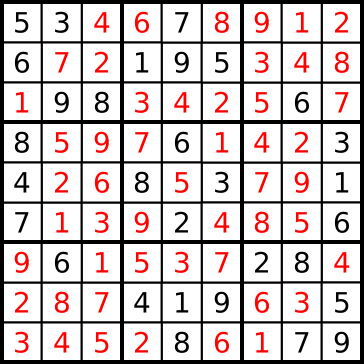
There are two kind of programming languages. One is the algorithmic language, like C++ or Java. We tell algorithms to a computer by programming. Another one is the declarative language, like SQL or Prolog. We just tell the computer what we have and what we want. Then the computer will return what we want. DLV is a system to find answer set defined by A-Prolog.

The Sudoku problem is the one on its Wikipedia page:http://en.wikipedia.org/wiki/Sudoku
node(5,1,1,1).
node(3,1,2,1).
node(6,2,1,1).
node(9,3,2,1).
node(8,3,3,1).
node(7,1,5,2).
node(1,2,4,2).
node(9,2,5,2).
node(5,2,6,2).
node(6,3,8,3).
node(8,4,1,4).
node(4,5,1,4).
node(7,6,1,4).
node(6,4,5,5).
node(8,5,4,5).
node(3,5,6,5).
node(2,6,5,5).
node(3,4,9,6).
node(1,5,9,6).
node(6,6,9,6).
node(6,7,2,7).
node(4,8,4,8).
node(1,8,5,8).
node(9,8,6,8).
node(8,9,5,8).
node(2,7,7,9).
node(8,7,8,9).
node(5,8,9,5).
node(7,9,8,9).
node(9,9,9,9).

%coordinante(row, column, block)
coordinate(1,1,1).
coordinate(1,2,1).
coordinate(1,3,1).
coordinate(2,1,1).
coordinate(2,2,1).
coordinate(2,3,1).
coordinate(3,1,1).
coordinate(3,2,1).
coordinate(3,3,1).

coordinate(1,4,2).
coordinate(1,5,2).
coordinate(1,6,2).
coordinate(2,4,2).
coordinate(2,5,2).
coordinate(2,6,2).
coordinate(3,4,2).
coordinate(3,5,2).
coordinate(3,6,2).

coordinate(1,7,3).
coordinate(1,8,3).
coordinate(1,9,3).
coordinate(2,7,3).
coordinate(2,8,3).
coordinate(2,9,3).
coordinate(3,7,3).
coordinate(3,8,3).
coordinate(3,9,3).

coordinate(4,1,4).
coordinate(4,2,4).
coordinate(4,3,4).
coordinate(5,1,4).
coordinate(5,2,4).
coordinate(5,3,4).
coordinate(6,1,4).
coordinate(6,2,4).
coordinate(6,3,4).

coordinate(4,4,5).
coordinate(4,5,5).
coordinate(4,6,5).
coordinate(5,4,5).
coordinate(5,5,5).
coordinate(5,6,5).
coordinate(6,4,5).
coordinate(6,5,5).
coordinate(6,6,5).

coordinate(4,7,6).
coordinate(4,8,6).
coordinate(4,9,6).
coordinate(5,7,6).
coordinate(5,8,6).
coordinate(5,9,6).
coordinate(6,7,6).
coordinate(6,8,6).
coordinate(6,9,6).

coordinate(7,1,7).
coordinate(7,2,7).
coordinate(7,3,7).
coordinate(8,1,7).
coordinate(8,2,7).
coordinate(8,3,7).
coordinate(9,1,7).
coordinate(9,2,7).
coordinate(9,3,7).

coordinate(7,4,8).
coordinate(7,5,8).
coordinate(7,6,8).
coordinate(8,4,8).
coordinate(8,5,8).
coordinate(8,6,8).
coordinate(9,4,8).
coordinate(9,5,8).
coordinate(9,6,8).

coordinate(7,7,9).
coordinate(7,8,9).
coordinate(7,9,9).
coordinate(8,7,9).
coordinate(8,8,9).
coordinate(8,9,9).
coordinate(9,7,9).
coordinate(9,8,9).
coordinate(9,9,9).

%node(value,X,Y,Block)
node(1,X,Y,B) v node(2,X,Y,B) v node(3,X,Y,B) v node(4,X,Y,B) v node(5,X,Y,B) v node(6,X,Y,B) v node(7,X,Y,B) v node(8,X,Y,B) v node(9,X,Y,B) :- coordinate(X,Y,B).

%uniqueness in colomn
:-node(CommonValue,X1,Y1,B1),node(CommonValue,X2,Y2,B2),X1!=X2,Y1=Y2,coordinate(X1,Y1,B1),coordinate(X2,Y2,B2).

%uniqueness in row
:-node(CommonValue,X1,Y1,B1),node(CommonValue,X2,Y2,B2),X1=X2,Y1!=Y2,coordinate(X1,Y1,B1),coordinate(X2,Y2,B2).

%uniqueness in block
:-node(CommonValue,X1,Y1,CommonBlock),node(CommonValue,X2,Y2,CommonBlock),X1!=X2, Y1!=Y2, coordinate(X1,Y1,CommonBlock),coordinate(X2,Y2,CommonBlock).

Here is the output
DLV [build BEN/Jul 14 2006 gcc 3.4.4 20050314 (prerelease) (Debian 3.4.3-13)]

{node(1,2,4,2), node(1,5,9,6), node(1,8,5,8), node(2,6,5,5), node(2,7,7,9), node(3,1,2,1), node(3,4,9,6), node(3,5,6,5), node(4,5,1,4), node(4,8,4,8), node(5,1,1,1), node(5,2,6,2), node(5,8,9,5), node(6,2,1,1), node(6,3,8,3), node(6,4,5,5), node(6,6,9,6), node(6,7,2,7), node(7,1,5,2), node(7,6,1,4), node(7,9,8,9), node(8,3,3,1), node(8,4,1,4), node(8,5,4,5), node(8,7,8,9), node(8,9,5,8), node(9,2,5,2), node(9,3,2,1), node(9,8,6,8), node(9,9,9,9), node(4,1,3,1), node(6,1,4,2), node(8,1,6,2), node(9,1,7,3), node(1,1,8,3), node(2,1,9,3), node(7,2,2,1), node(2,2,3,1), node(3,2,7,3), node(4,2,8,3), node(8,2,9,3), node(1,3,1,1), node(3,3,4,2), node(4,3,5,2), node(2,3,6,2), node(5,3,7,3), node(7,3,9,3), node(5,4,2,4), node(9,4,3,4), node(7,4,4,5), node(1,4,6,5), node(4,4,7,6), node(2,4,8,6), node(2,5,2,4), node(6,5,3,4), node(5,5,5,5), node(7,5,7,6), node(9,5,8,6), node(1,6,2,4), node(3,6,3,4), node(9,6,4,5), node(4,6,6,5), node(8,6,7,6), node(5,6,8,6), node(9,7,1,7), node(1,7,3,7), node(5,7,4,8), node(3,7,5,8), node(7,7,6,8), node(4,7,9,9), node(2,8,1,7), node(8,8,2,7), node(7,8,3,7), node(6,8,7,9), node(3,8,8,9), node(5,8,9,9), node(3,9,1,7), node(4,9,2,7), node(5,9,3,7), node(2,9,4,8), node(6,9,6,8), node(1,9,7,9)}

2007-09-11

Connecting TCP/Socket Network printer on Linux

Forrest Sheng Bao <http://forrest.bao.googlepages.com >

TCP/Socket network printers are not connected to a single computer but to Internet outlet. They use TCP protocol to transfer PostScript command. So, they are working on industrial standards and do not require you to have special OS. Gnome desktop on Linux provides an easy way to connect them.

Click "System" -> "Administrator" -> "Printing".
Double click "New Printer".

Then select "Network Printer", "TCP/Socket" and enter the domain name or IP address of the printer. The default port is 9100.

On the next page, select proper manufacture, model and driver. You are recommended to use Postscript.

Then, follow instructions to finish.

2007-09-09

Encrypt your hard drives on Linux by dm-crypt and LUKS

Forrest Sheng Bao <http://forrest.bao.googlepages.com >

dm-crypt, an encryption on a mapping device was introduced into stable Linux kernel since kernel version 2.6.4. Encryption on a mapping device means data are firstly written into a mapping device, which is virtual and mapped to a real physical devices. In this manner, you can encrypt the entire partition, including the file system journals. dm-crypt also has a good extension, LUKS, Linux Unified Key Setup.

In this article, I will introduce two options. The first one doesn't use LUKS and is suitable for internal hard drives. The second one uses LUKS and is suitable for removable storage, such as USB memory stick.

The environment is Ubuntu 8.10 x86. But I think it should also work for other Linux distributions.

Step 1: Install required packages:
$ sudo  apt-get install cryptsetup

Step 2: load modules:
$ sudo modprobe dm_mod
$ sudo modprobe dm_crypt

Now check that /dev/mapper exists:
$ sudo ls -l /dev/mapper/control
crw-rw---- 1 root root 10, 62 2007-09-08 21:15 /dev/mapper/control

Check that AES is supported:
$ sudo grep aes /proc/crypto
name         : aes
driver       : aes-generic
module       : aes

Check that the cyrpt target is supported:
$ sudo dmsetup  targets
crypt            v1.3.0
striped          v1.0.2
linear           v1.0.2
error            v1.0.1

Before you move forward, I wanna warn you that
DO NOT perform following operations on a device or a partition that is already mounted.

Now we will have a fork. One is non-LUKS option, suitable for internal hard drive and the other is LUKS option, suitable for portable devices.

Option 1: non-LUKS option, suitable for internal hard drive:
Step 3: creating the mapping between encrypted device (/dev/mapper/forrest) and real physical device (/dev/sda8):
$ cryptsetup -y create forrest /dev/sda8
Enter passphrase:
Verify passphrase:

Confirm it works:
$ sudo dmsetup ls
forrest (254, 0)
$ ls -l /dev/mapper/
total 0
crw-rw---- 1 root root  10, 63 2007-09-08 22:50 control
brw-rw---- 1 root disk 254,  0 2007-09-08 22:51 forrest

Step 4: Create file systems on the encrypted device:
Attention, not on the real physical devices but on the encrypted device.
DO IT JUST ONCE! DO NOT DO IT EVERY TIME YOU MOUNT/READ/WRITE AN ENCRYPTED PARTITION! YOU WILL LOST ALL YOUR DATA!
$ sudo mkfs.ext3 -m 1 /dev/mapper/forrest -L FORREST

I used some ext3 file system options.

Step 5: Mount the encrypted device:
$ sudo mkdir /forrest
$ sudo mount /dev/mapper/forrest /forrest

Step 6: Make it writable to myself:
$ sudo chown forrest:forrest /backup

Verify it works:
$ grep forrest /proc/mounts
/dev/mapper/forrest /forrest ext3 rw,data=ordered 0 0

Step 7: To umount gracefully,
sudo umount /forrest
sudo cryptsetup remove /dev/mapper/forrest

DONE!

Note 1: Next time, if you wanna manually mount this partition, you just need to run these two command:
sudo cryptsetup create forrest /dev/sda8
mount /dev/mapper/forrest /forrest 

Note 2: You can also make it to be mounted when the computer boots.
Make /etc/crypttab like this:
forrest         /dev/sda8               none            cipher=aes

Then insert this line into /etc/fstab:
/dev/mapper/forrest     /forrest        ext3    defaults        0 1

When you start your computer, you will see a prompt to enter the passphrase. But I don't know why the passphrase are displayed.

END of Option 1.

Option 2: LUKS option, suitable for portable devices, such as USB drive:

Step 3: Setup LUKS:
$ sudo cryptsetup --verbose --verify-passphrase luksFormat /dev/hdd1
WARNING!
========
This will overwrite data on /dev/hdd1 irrevocably.

Are you sure? (Type uppercase yes): YES
Enter LUKS passphrase:
Verify passphrase:
Command successful.

Step 4: Open the encrypted device "/dev/mapper/backup" and map it to a real physical device "/dev/hdd1":
$ sudo cryptsetup luksOpen /dev/hdd1 backup
Enter LUKS passphrase:
key slot 0 unlocked.
Command successful.

Confirm it works:
$ sudo dmsetup  ls
backup  (254, 1)
forrest (254, 0)
$ ls -l /dev/mapper/
total 0
brw-rw---- 1 root disk 254,  1 2007-09-09 16:36 backup
crw-rw---- 1 root root  10, 63 2007-09-08 22:50 control
brw-rw---- 1 root disk 254,  0 2007-09-08 22:51 forrest


Step 5: Create file systems on the encrypted device. Attention, not on the real physical devices but on the encrypted device.
DO IT JUST ONCE! DO NOT DO IT EVERY TIME YOU MOUNT/READ/WRITE AN ENCRYPTED PARTITION! YOU WILL LOST ALL YOUR DATA!
$ sudo mkfs.ext3 -m 1 /dev/mapper/backup -L BAKCUP.SG

I used some ext3 file system options.

Step 6: Mount the encrypted device (/dev/mapper/backup) to a mount point (/backup).
$ sudo mkdir /backup
$ sudo mount /dev/mapper/backup /backup/

Step 7: Make it writable to myself:
$ sudo chown forrest:forrest /backup

Verify it works:
$ grep backup /proc/mounts
/dev/mapper/backup /backup ext3 rw,data=ordered 0 0

Step 8: To umount gracefully:
$ sudo umount /backup
$ sudo cryptsetup luksClose backup 

DONE!

Note 1: Next time, if you wanna mount this partition manually, just do luksopen and mount operations:
sudo cryptsetup luksOpen /dev/hdd1 backup
sudo mount /dev/mapper/backup /backup/

END of Option 2.


References:
  1. dm-crypt Wiki: HOWTO, http://www.saout.de/tikiwiki/tiki-print.php?page=HOWTO
  2. Encrypted Device Using LUKS, dm-crypt Wiki, http://www.saout.de/tikiwiki/tiki-print.php?page=EncryptedDeviceUsingLUKS
  3. HOWTO: Disk encryption with dm-crypt/LUKS and Debian, Uwe Hermann's blog, http://www.hermann-uwe.de/blog/howto-disk-encryption-with-dm-crypt-luks-and-debian
  4. LUKS homepage, http://luks.endorphin.org/
  5. dm-crypt homepage, http://www.saout.de/misc/dm-crypt/
  6. Encrypting partitions using dm-crypt and the 2.6 series kernel, Linux.com, http://www.linux.com/articles/36596